YouTube merupakan salah satu penyedia layanan video terbesar saat ini. Mungkin 80 % pengguna internet saat ini mengenal Youtube, namun Youtube tidak menyediakan pasilitas download langsung didalam nya. Tapi Youtube bisa di download dengan software dari Youtube dan web lain nya.
Takuma Mori, orang jepang menemukan cara untuk menconvert FLV secara Online. FLV Online dapat diubah menjadi 5 macam :
Tinggal pilih aja...!!!
Caranya cukup mudah. Tinggal anda instal dulu media player dari FLV agar vidio yang anda download bisa di putar ( palay back ). Untuk bisa menginstal media player dari FLV, anda bisa kunjingi www.download.com atau anda bisa download langsung
Setelah media player diinstal, anda bisa kunjungi keepvid.com untuk memulai ngedownload Youtube.Web ini yang biasa saya gunakan untuk ngedownload video dari youtube dari sekian banyak banyak Web yang khusus untuk pasilitas Download video Youtube. Cara ngedownload nya gimana...?
Anda tinggal copy URL dari youtube yang ini anda download, misal nya seperti ini :
Terus anda paste URL yang tadi di Web keepvid.com, Misal nya seperti ini :
Kalau anda sudah mengelik Download file, nanti ada file dengan nama random yang minta di save atau di Run. Anda ganti nama nya atau rename dengan ahiran .flv, file yang anda downloan harus bersetatus FLV, misal nya di renam blablabla.flv
oC deh...mungkin sampai disini dulu dari saya, untuk lebih jelas nya silahkan kunjungi web yang lain dan selamat mencoba.


Adobe yesterday posted a new build of Adobe Media Player on Adobe Labs. User Interface is about the same. Only Adobe Media player now can play videos that are encoded using H.264 codec.
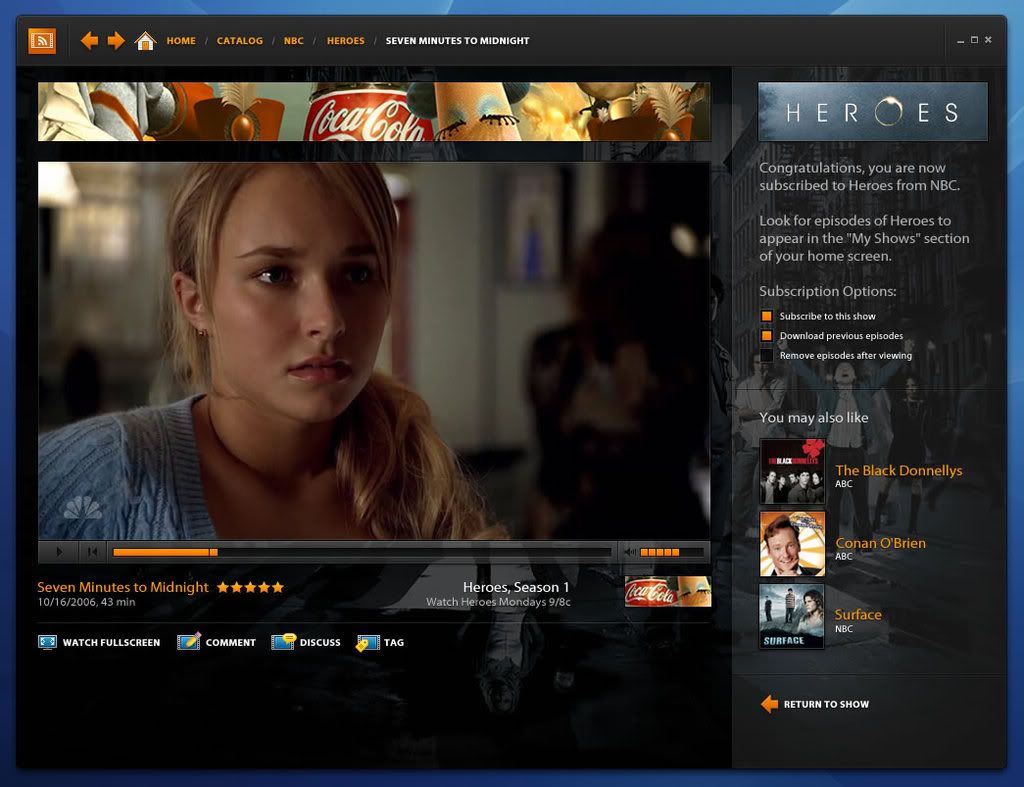
What i love most about this is the capability to play Flash video (flv), podcasts and QuickTime movies.
You can try new version right here : http://www.adobe.com
 Adobe
AdobeAdobe Unveils Next Generation Internet Video Solution
For content publishers, Adobe Media Player enables better ways to deliver, monetize, brand, track and protect video content. It provides an array of video delivery options for high-quality online and offline playback, including on-demand streaming, live streaming, progressive download, and protected download-and-play. The Adobe Media Player enables a wider selection of monetization and branding options including viewer-centric dynamic advertising and the ability to customize the look and feel of the player on the fly to match the brand or theme of the currently playing content.
Advanced Analytics and Content Protection
The technology provides content publishers a standardized toolbox to deploy a variety of innovative new advertising formats, and to compile permission-based analytics data, both online and offline, to better understand their audiences. Building on Adobe's rich history of document protection technology, Adobe Media Player plans to offer content publishers a range of protection options, including streaming encryption, content integrity protection and identity-based protection.
Adobe’s Emerging Internet Video Ecosystem
Adobe Media Player is a key part of Adobe’s emerging ecosystem for the creation and delivery of next generation Internet video. It complements and leverages other Adobe components including: Adobe Flash® Player; the newly announced Adobe® Flash® CS3 Professional; Flash® Media Server 2, server software for streaming media applications; Flash® Lite™ mobile video playback technology; Adobe’s range of media authoring tools such as Adobe Creative Suite® 3 Production Premium for video, audio and motion graphics production; and Adobe Media Encoder for compression and live streaming.
About Adobe Media Player
Adobe Media Player is developed using Apollo, the code name of Adobe’s recently announced application runtime that empowers content publishers and web developers to build and deploy rich Internet applications (RIAs) on the desktop using technologies such as Flash, PDF, and HTML. Adobe Media Player is planned to be available as a free beta download from the Adobe Web site later in 2007 with full availability expected by the end of the year, from Adobe and a wide range of media and technology partners.
About Adobe Systems Incorporated
Adobe revolutionizes how the world engages with ideas and information – anytime, anywhere and through any medium. For more information, visit www.adobe.com. Read More......
Program Information
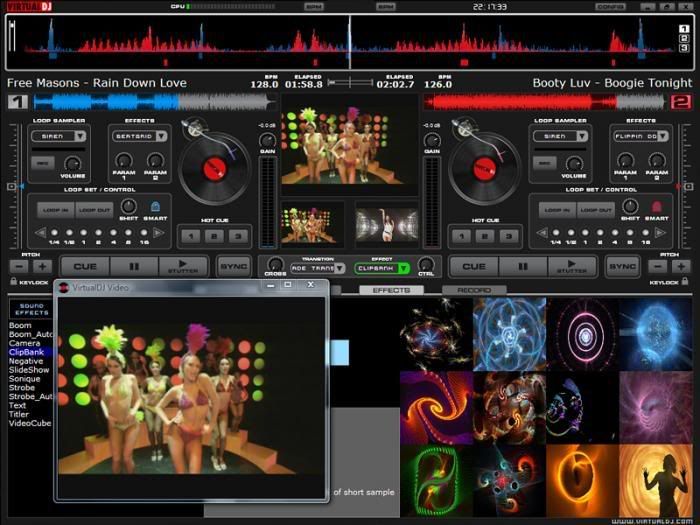
- License : Free to try
- OS : Win 98/ME/2000/XP
- File Size : 10.2 MB
- Donwloads : 231,874
(Trial version)
"Publisher's description of Virtual DJ software"
Mix it upVirtualDJ is the DJ software used by many big brands such as Numark, Denon or Gemini, and is used around the world by bedroom DJs and professional superstars alike. It features cutting-edge technology such as advanced beatlocking, automatic seamless loops, synchronized sampler, on the fly remix, music video mixing and scratching, timecode vinyl control, visual beat display, DRM, VST and freeframe effects, Internet broadcasting, and karaoke Read More......

WAV Converter 3.30
| When it comes to digital music, sometimes you want the compactness of MP3s, and sometimes you want the quality of a CD. MP3 WAV Converter makes it easy to have both. The program converts .wav music files to .mp3 format to reduce the size of the files by roughly a factor of 10, and it changes MP3s to .wav files for playback on standard CD players. It also doubles as an audio player, minus the fancy skins and light shows most players have these days. The program completes conversions in seconds, and you can convert and play batches of files at a time. Any .wav files converted to MP3s are automatically normalized to a consistent volume level. MP3 to WAV Converter software works on any Windows platform. |
Read More......
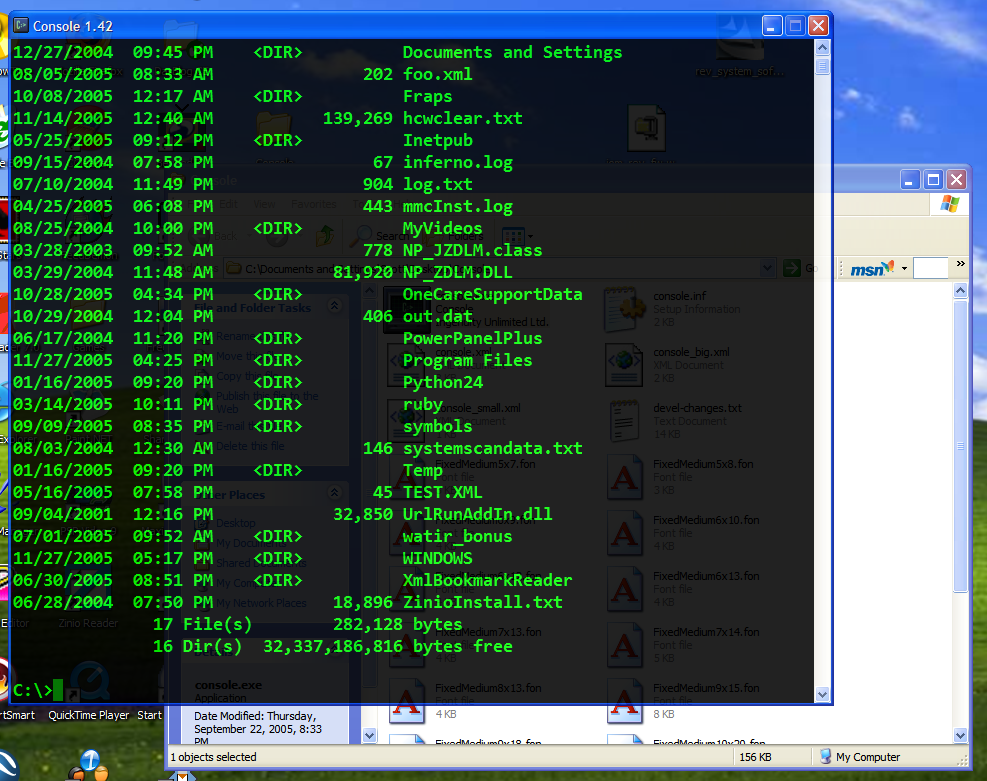
The #1 UI thing, for me, has been the transparent terminal window. It's silly, sure, but it's nice. So, I went hunting for one. I knew from my previous hunts for the same thing that it was hard, as Window's Console (cmd.exe) prompt is a different kind of Window than most. I haven't found any transparency programs that would let affect cmd.exe.
I did find this clever hack called Console at Source Forge. It isn't a console itself, rather it's a console shadower. Cmd.exe is still doing the work, but Console has hidden it and is capturing and showing the output itself.
Attached is my console.xml settings file with the colors, font (Consolas), size and transparency settings that I like. File Attachment: console.xml (7 KB) The only thing is that I haven't figured out how to make the window resizable. Otherwise, I've found a nice new command prompt to play with. We'll see if it makes the grade, or if I switch back.


 Print this page


 Account Berbahasa Indonesia


Partner site


relevance

admin
tuker link

Copy code dibawah ini lalu paste di sidebar blog anda